BlackBerry Business Apps

PocketMac Business App for BlackBerry Review

These days, business can take many different forms. If you are a businessperson that is interested in multimedia and facilitating connections between people in that way, it could very well be the case that your business is reliant on Macintosh software. If this is the case, you might be slightly discouraged by the fact that the BlackBerry really doesn’t have a lot going in that area. At least, that used to be the case until the creation of PocketMac Business.

Turn your BlackBerry into a PocketMac

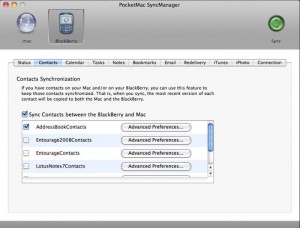
We all know that Pocket PCs exist, but did you know that you can make your BlackBerry into a PocketMac?  This is certainly something that you can do with multiple apps but it is really the PocketMac Business app that can give you the edge that you need while at the same time keeping all of the things that you love about your BlackBerry in place.

pocketmac-blackberry-business-app

Combine business and raw multimedia power

The advantage that the Mac setup has over the PC setup is the fact that the former is so strong when it comes to multimedia applications and computing. However, in the business environment, those advantages seem to dry up because of the relative lack of professionalism that many Mac applications have. This is not the case with PocketMac business app for BlackBerry. You get that same great raw power in the multimedia area while at the same time getting the opportunity to keep things professional with your BlackBerry device.

Keep your current setup

Although PocketMac mobile application will allow you to put your BlackBerry in sync with your Mac and turn it into a PocketMac device, it is also true that you can maintain all of the current setups that you have with your BlackBerry device. This can come in very handy during times when you have a Mac at home and a PC at work or vice versa. Versatility is important in today’s world and PocketMac Business is a BlackBerry app that definitely has the power to show versatility.

Final Score

PocketMac App for BlackBerry receives a final score of 8 out of 10 from us. The fact that it does not have the greatest free support out there is really what prevented it from scoring higher. You can check this app out in its full glory for 90 days, but at that point you’ll have to decide between full and lite versions of it. It can score higher later on by adopting a freeware version that has less features but will still get the job done.

VN:R_U [1.8.8_1072]
Rating: 8.0/10 (1 vote cast)
VN:F [1.8.8_1072]
Rating: 0 (from 0 votes)
               
  • Share/Bookmark

Be the first to comment - What do you think?  Posted by techman - March 1, 2010 at 11:08 am

Categories: BlackBerry Apps, BlackBerry Business Apps   Tags: , ,

The iSkoot for Skype App for BlackBerry

Communication is an essential element for business. It is more important than personal communication because businesses that work together soar together. In the past, the geographical extent of most businesses was smaller and communication for business was easier. As the economy has become more globalized in the world today, communication for business has become harder. Skype is certainly a great choice for business communication for budding and intermediate enterprises and the iSkoot for Skype app is one that will give you a great jump in that area.

Manage your Skype account from your BlackBerry

The first thing that you can do with iSkoot for Skype is manage your contacts from your BlackBerry device. This means that not only can you gain access to the full list of contacts, you can also update your own status on Skype and even add and remove different contacts from your list depending on how the situation goes. This will allow you to quickly respond to business concerns and it could very well be the app that makes Skype a viable option for your business needs.

iskoot-for-skype-app-for-blackberry

Access important Skype features

Managing your account directly from the BlackBerry is important, but it is nowhere near as important as gaining access to important Skype features. Without them, this is essentially crippled software that is not worth your time. Fortunately, you can get push-button Skype calling, access to all of the Skype Out features and of course chatting live over Skype is also available on this BlackBerry app. Being able to do all of these things while mobile might very well be what you need to make Skype into the main communication solution for your current business situation.

Final Score

The iSkoot for Skype application is a fantastic BlackBerry app and it has received a final score of 9 out of 10 from us. It is one of the best software packages out there in terms of excellent specialization. Skype is great for communication, but few in the business community would consider it a long term solution. Now that you can use the Skype calling from your BlackBerry while chatting and increasing your network, the dynamics of those decisions have completely changed. Communication in business is changing and with apps like this one readily available for your BlackBerry, it could very well be true that the businesses that adopt solutions like this one are the ones that will succeed in the long term.

VN:R_U [1.8.8_1072]
Rating: 9.0/10 (1 vote cast)
VN:F [1.8.8_1072]
Rating: +1 (from 1 vote)
               
  • Share/Bookmark

Be the first to comment - What do you think?  Posted by techman - February 28, 2010 at 10:42 am

Categories: BlackBerry Apps, BlackBerry Business Apps, BlackBerry Communication Apps   Tags: , ,

An Overview of BlackBerry Enterprise Server 5.0

The BlackBerry Enterprise Server (BES) is all about creating a secure, central environment for your communications software, apps, and wireless network, allowing you to use all the functions of your BlackBerry with confidence. The BES supports the US government encryption standard, the AES, and the Triple DES encryption standard used to ensure that all electronic payments are handled securely.  With this level of security you can be sure that any data you transmit using your wireless BlackBerry device won’t be compromised. If you need any special components for your business you will be pleased to know that the BES supports several optional apps, components and configurations, and allows for built to order apps.

A key feature of the BES 5.0 is the ability to manage BlackBerry devices and user accounts remotely through the BlackBerry Administration Service.  This tool has many functions and can even provide a second level administration access to certain functions, allowing some features to be managed without needing full administration rights access.
You can set up reporting features, alerts, and troubleshooting options for the overall BlackBerry environment using BES 5.0 and an ingenious use of colour coding allows a user or administrator to quickly identify whether problems are rooted with user issues or in the server.

For the person actually holding the phone BES 5.0 acts to make the whole smart phone more user friendly.  It allows a greater degree of control over the desktop features, such as organising emails, updating and rearranging diary entries, forwarding appointment details with attachments and managing file folders in e-mail.

In general terms BES 5.0 is a great tool for the business with staff on the move and can help make your administrators life much easier!

VN:R_U [1.8.8_1072]
Rating: 0.0/10 (0 votes cast)
VN:F [1.8.8_1072]
Rating: 0 (from 0 votes)
               
  • Share/Bookmark

Be the first to comment - What do you think?  Posted by admin - September 4, 2009 at 4:54 am

Categories: BlackBerry Business Apps   Tags:

Blackberry eOffice App

Name: eOffice

Summary:

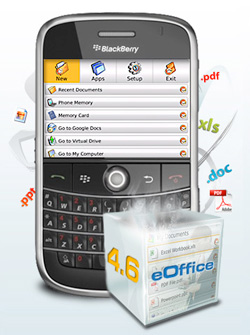
eOffice is a document editor app in BlackBerry smart phones. It is integrated with Google Spreadsheets and Docs. With this application, you can easily edit and open files in your online account. Saving files as well is permitted by this application.

User Interaction:

The experience of bringing your office with you in your BlackBerry smart phone is now possible with eOffice. eOffice gives you convenience of a laptop for accessing, creating, and editing your files. It offers the best viewing experience as well for your BlackBerry smart phone.

Aside from the most powerful office applications as Word & Spreadsheet Processor, and Integrated Spell-Checker, eOffice allows you to access and search your computer anywhere. eOffice has a personal and unlimited online storage for your files. It can collaborate real time Google documents, fax directly, and print documents and photos from your BlackBerry smart phone. Emailing files to your desktop is also possible with eOffice.

User Interface:

eOffice application has the best office files viewing experience for your BlackBerry smart phone. From this application, you can view various types of supported files for Microsoft such as PowerPoint, Excel, and Word. Images, Fares, CSV, and PDF files can also be viewed through this application. eOffice is featured with attachment viewing that has a magnifier or zoom function. This function allows you to view the details of every image including tables, graphics, and fonts. The document views in eOffice application are highly optimized by BlackBerry smart phone, thus it gives you easiness in quick browsing. Furthermore, the application provides the most comprehensive format support in viewing Email images and attachments.

eOffice application has a reorganized menu structure and a streamlined user interface that allows smart phone professionals to easily share, edit, view, and access files.

blackberry-eoffice-app

Utility and Productivity:

The productivity of eOffice application has everything that smart phone professionals needs when it comes to modern and wireless document management solution. Among its main features are the most powerful Word Processor, Spreadsheet Processor, and Integrated Spell-Checker. The Word Processor provides the capability of editing Microsoft Word documents while maintaining and retaining the original document format. The level of editing capability of this processor include creation of bulleted list, paragraph formatting, and changing fonts and font styles.

The Spreadsheet Processor in eOffice application has the main function of creating, viewing, and editing Microsoft Excel spreadsheet. It even supports Excel functions including data formats, graphs, diagrams, and scientific and mathematical formulas. Meanwhile the Integrated Spell-Checker in eOffice application ensures that your emails and documents have free with spelling errors. Together with this program, you can include your specialized dictionaries or thesaurus for a complete reference tool in your BlackBerry smart phone.

Directly from your BlackBerry smart phone, you can access and search your desktop files anywhere with the integration of eOffice application. Just the same, you can also view, edit, copy files, and send as attachments.

eOffice application comes with an unlimited and subscription-free online storage for your files that can be access on your BlackBerry smart phone. This online storage is protected with user specific username and password, and highly secured with the PDM5 encryption as well. Files that you store on your personal online storage can be accessed in your BlackBerry smart phone with the integration of eOffice application.

Rating:

(9.0 out of 10) With eOffice application installed on your BlackBerry smart phone, you already have a comprehensive file manager that is always with you where you can access your files anywhere and everywhere. This application is more than just a file manager but it is also a personal online storage equipped with powerful capabilities such as renaming files, creating new files or folders, and moving or copying files in between storage locations.

VN:R_U [1.8.8_1072]
Rating: 9.0/10 (1 vote cast)
VN:F [1.8.8_1072]
Rating: 0 (from 0 votes)
               
  • Share/Bookmark

Be the first to comment - What do you think?  Posted by admin - June 20, 2009 at 2:29 pm

Categories: BlackBerry Business Apps   Tags: ,

Tweet This Post links powered by Tweet This v1.3.9, a WordPress plugin for Twitter.