Push Notifications for Facebook and Twitter with Boxcar App for iPhone
There are plenty of different apps out there that act as clients for a web 2.0 site like Facebook or like Twitter. However, when you look at the number of mobile apps out there that will give you client status for both, the number decreases. When you narrow the list down even further through push notifications, the end result is a handful of apps and even fewer decent ones. Boxcar app for iPhone is definitely one of the decent ones.
Push notifications for Twitter
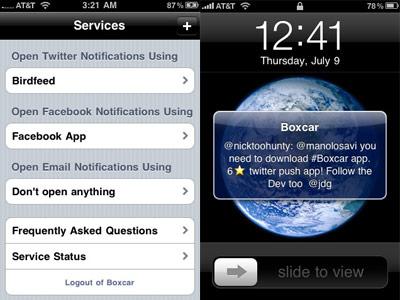
No matter what it is you want to do on Twitter, Boxcar iPhone app will give you push notifications whenever something new goes down. If you want to review your direct messages from your iPhone, this app will let you do that. If you want to look at replies to tweets that you’ve made, once again all you have to do is take a look at the iPhone app in order to get those notifications.
As a matter of fact, you can get the same functionality with both searches and trending topics with Twitter in the latest version of Boxcar iPhone mobile application. All of these things are very impressive aspects of iPhone Boxcar app. Add to that the fact that Boxcar for the iPhone supports an unlimited number of Twitter accounts and what you have is certainly something very special.
Push notifications for Facebook
No matter what the Facebook alert is, Boxcar app for iPhone will automatically coordinate with the Facebook Connect service in the background and deliver those alerts right to your iPhone when they take place. Do you have a particular proclivity towards wanting to know about wall posts as soon as they take place? What about private messages? Push notifications are enabled for all of these aspects of Facebook when you use Boxcar iPhone mobile app to connect to your Facebook account.
Final Score
Boxcar app for iPhone has some great features and it has demonstrated an ability to improve and add functionality over the course of time. These are the two things that you really want in any iPhone app, but they are absolutely critical in web 2.0 apps that act as iPhone clients. Because of this and because of the fact that we appreciate the excellence of this app, we’ve given Boxcar iPhone app a final score of 9 out of 10.
Categories: iPhone Apps, iPhone Communication Apps, iPhone Lifestyle Apps Tags: Boxcar App for iPhone, Boxcar iPhone app, iPhone Boxcar app
Review of Thumbtacts for iPhone
The world of mobile smart phone communication is a competitive one and while the iPhone has certainly done a lot to push forth the boundaries of communication, it is also true that one big criticism of it has been that the standard phone features that it brings to the table are not on par with competitor systems like the Blackberry. Thumbtacts is a free iPhone communications app that resolves to fix this problem by allowing you to easily phone a contact with just one hand on the iPhone.
Letters at the top, suggestions at the bottom
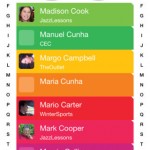
The way that Thumbtacts iPhone app works is quite simple. Instead of going to your address book, you start this app up and immediately get presented with four choices from your contacts list. You can tap the more button to change those choices or you can tap one of the choices in order to bring up the next list. Through this way, you can iteratively cycle through your contacts until you get the one that you want to phone without having to deal with the address book that at the moment is probably one of the weak points of the iPhone’s overall product presentation.
![]()
Dial numbers with one hand
If there is one criticism of most iPhone products that has been particularly difficult to defend, it is the criticism that calling someone with one hand is very hard to do. The iPhone makes it hard to do for many reasons, one of which is that the screen is too large and the numbers too far apart. For the person walking with two armloads of material, this can make using the iPhone very frustrating indeed. Thumbtacts iPhone mobile application allows you to cycle through contacts and call the one you want to reach with just one hand and for that reason allows you to turn your iPhone back into a normal phone that you can once again use with just one hand. For many people, this will be an absolute boon that immediately elevates the presence of the iPhone in their eyes.
Final Score
When iPhone Thumbtacts app first came out, it was an immediate hit. Within a week there were already 10,000 downloads and that number has been quickly growing ever since. This is a free app that greatly enhances the communications quality of the iPhone which after all is supposed to be the reason that people have it in the first place. We love it and give this app a final score of 10 out of 10.
Categories: iPhone Apps, iPhone Communication Apps Tags: iPhone Communication Apps, Thumbtacts for iPhone, Thumbtacts iPhone app
IM+ for iPhone Review
IM+ is a perfect instant messaging application for iPhone users. The advanced iPhone IM+ app efficiently connect different chat interfaces to your iPhone. This app helps you to stay logged in several messenger accounts simultaneously to message all your friends across the world.
The All-in-One Messenger App
There are a lot of instant messenger applications are available for your iPhone. The IM+ iPhone app connects all the popular message services into one app easily. IM+ supports many messenger services such as Yahoo, MSN/Live Messenger, Jabber, Google Talk, MySpace, AIM/iChat, ICQ and more. In addition to the common IM client features, IM+ provides some advanced features including email push notifications, speech recognition, geo-location, built-in browser and so on.

IM+ Main Menu Features
When you open iPhone IM+ mobile application, the first thing you have to do is to go and set up all your favorite messaging services that you want to use. You can do this by selecting the More option. Choose Accounts tab and add the different accounts you like. There are four main options you can access from the main page. They are Contacts, Inbox, Favorites and Status. The Contacts option displays all the contacts from your different accounts. In the Inbox option you can check all your conversation history. You can add your favorite contacts to Favorite option. The Status tab helps you to set your status as online, away, invisible or offline.
Advanced Messaging Features
IM+ app provides a variety of unique features to help you to stay connected with all IM clients. The app provides an email push notification function that instantly notifies you when a new mail arrives. The function supports GMail, Yahoo and Hotmail. Another unique feature is the speech recognition feature. It helps you to dictate messages and you have them typed out. You can set custom status messages and geo-location feature helps your friends to easily locate you. You can also do multi-tasking with built-in browser. You can browse web and open hyperlinks from messages without logging off IM+. There are also animated emoticons and you have also the option to turn off them. You can set various customizable sounds for different functions such as incoming message, push alert, contact online and so on.
Final Thoughts
The IM+ app is easy-to-use and works well with iPhone models. You can download IM+ application free from iTunes application store. The IM+ iPhone app is constantly upgrading and you can expect new advanced features in every month.
Categories: iPhone Apps, iPhone Communication Apps Tags: IM+ for iPhone, IM+ iPhone communication app, iPhone IM+ app
Beejive Instant Messaging App for iPhone Review
The Perfect Instant Messenger for your iPhone
Beejive IM App is a feature rich, multi-protocol instant messaging clients for the iPhone and iPod Touch. This social networking app was developed by Beejive, Inc. It uses your Apple iPhone’s existing data plan to send as well as receive messages, photos, etc.
Beejive IM App for iPhone supports majority of the standard instant messaging services and supports some features that other clients don’t support like a notification system and file transfers. Google Talk, ICQ, MSN/Windows Live, Jabber, MySpace IM, AIM, and Yahoo! Messenger are some of the protocols supported by the BeejiveIM.
With Beejive iPhone App, not only you can send text messages, but also you are allowed to send photos as well as voice notes. Also, you can view and receive files of formats including MS Office, video, music, iWork, etc. Its super-customizable Settings allow you to tweak the send and receive sounds as well. Another outstanding feature of Beejive IM app is that by shaking your device you can switch from one chat window to the other.

Features of Beejive IM App for iPhone
• Uses your iPhone’s existing data plan.
• No charges for SMS
• Reliable as well as proficient networking
• 24/7 network connection
• Works with multiple IM networks.
• Handles multiple accounts per network.
• WIFI connections supported
• Reconnects automatically in case of interruption in data service
• Allows you to manage buddy list by adding or removing names, groups, and blocking.
• Custom status messages can be set like invisible or an auto-away status.
• Allows you to alter privacy controls.
• Options to customize sound and vibrate settings.
• Options to set chat skins of your choice.
• Emoticon support.
• Allows you to chat in any language supported by iPhone.
• Option to email chat messages
• Options to call, browse or send emails straight away from the chat screen
• Push notification for incoming chats.
• Offers security by storing account information such as usernames and passwords locally on your iPhone.
• Switching between multiple simultaneous chats.
Requirements: iPhone firmware 2.0
Compatibility: iPhone/iPod touch
Conclusion
Beejive IM App for iPhone is now available through the Apple AppStore. Stay in touch with your friends on instant messaging services like Yahoo, AIM, MSN, MySpace, MobileMe, GoogleTalk, and more. This instant messaging app for iPhone has scored 9 out of 10.
Categories: iPhone Apps, iPhone Communication Apps Tags: Beejive IM App for iPhone, Beejive iPhone App, iPhone Instant Messaging Apps
MySpace Mobile App for iPhone Review
Social networking sites are getting more popular among people worldwide. MySpace is one of the most favorite social networking sites. Now iPhone users can enjoy all the features of MySpace online community through new innovative MySpace Mobile application. This mob app lets to take your favorite online community with you everywhere. Whatever you want to share, discover, connect or communicate, everything is possible through the sophisticated MySpace Mobile app.
Highly Integrated MySpace Experience
The MySpace Mobile iPhone app provides really excellent and structured social networking experience. This new mob app provides instant accessibility to your favorite MySpace global network. You can enjoy all the best MySpace features customized on your iPhone. You can send and receive messages, stay up-to-date with friend updates, upload pictures and much more. It provides the facility to browse photo albums and check out various profiles. Viewing and adding friends, pictures and comments are easy. The whole application is user-friendly, deeply optimized and exclusively designed for iPhone screen. Users can simply navigate through the screen and quickly access all the features.

Robust and Creative Features
After logging into MySpace Mobile, the home page is displayed with your profile picture. The home page provides a more truncated and organized version of MySpace webpage that includes all familiar menu features. Main menu features include My Profile, Friends Status and Mood, Friend Updates, Bulletins, Comments and Settings. The mail option is similar to normal mail app that allows to view your mailboxes. There is also an option to update your status. Comment option is simple and it allows you to commenting back and messaging. You can send messages to your friends. You can add more friends using this app and update your profile whenever you like. The app also lets you to upload pictures and also view your friend’s pictures. You can simply upload photos from your iphone to your profile, photo section and blogs. You can also read your favorite blogs and post your own blogs.
Conclusion
With MySpace Mobile app for iPhone, you can stay connected with your friends wherever you go. You can seamlessly traverse the MySpace online community on the go and you can easily access all your favorite features. The rich and functional app design covers the core aspects of social networking and ensures a natural feel for iPhone users. If you regularly use and update MySpace, this is a worthy application to download in your iPhone. The MySpace Mobile is completely free for iPhone users. You can download easily from App Store.